Showing posts with label Writing. Show all posts

Sunday, 28 May 2017

Using YouTube & Google Docs to Teach Recount Writing

For writing this term, our main focus is on Recounts.  I am trying to make my lessons more engaging and meaningful for my learners.  After using YouTube for poetry & learning about acceptance, I decided to use videos as inspiration for recount writing.

We have covered the language features used in recounts and we have learnt the acronym TREE to remember the structure of a recount. So this week we have narrowed our focus to the first paragraph of a recount - the 'Reveal' paragraph.

I chose to break my teaching down like this as I have found that the majority of my class struggles with writing. My thinking is that breaking down a recount into more manageable chunks will allow them to have a deeper understanding of each section. I also choose to break up my class into two groups.   This is because I want to make sure everyone is participating in the sessions.  Oftentimes, certain learners will share and contribute while others will remain quiet.

This week we used Google Docs and YouTube to learn more about the 'Reveal' Paragraph.  To start with we discussed the key components of a reveal paragraph - a hook to grab the reader's attention and the 5ws. Then we had a go at identifying the Ws and the hook in an exemplar paragraph.

First up, a vlog!


click here go to group 1's collaborative Google Doc
Then, we turned to the interesting bit! We used Google Docs as an online form of a modelling book.  Each student had their Chromebook and editing rights.  First we had a go at writing a reveal paragraph as a class.  I chose to use a vlog about her first bungy jumping experience.  We watched the first minute and discussed what we saw. We brainstormed as many answers to the 5ws as we could.  Then, we worked together to write our paragraph. Lastly, we added our 'hook'. After sharing each other's 'hooks' we combined the best ones and added to the beginning of our paragraph.

click here go to group 2's collaborative Google Doc

The Present: pair paragraphs


Next the students worked in pairs to write another 'Reveal' paragraph. I chose to use The Present. I felt that the students would find it easier to write about The Present because we have already used The Present to learn about acceptance (& more). Since we were only focussing on a 'Reveal' paragraph, we only used the first 30 seconds. Again, the pairs brainstormed 5ws and then began writing their paragraphs. I decided to get my students to choose the Ws that they felt was important with setting the scene.  I have found that sometimes recounts can get a little boring, as there is too much focus on addressing all the Ws (ie On the 21st of June on a cold afternoon, I was playing PlayStation... boring!). Instead, we chose fewer Ws and also elaborated on some of  ideas.


Going it alone


Lastly, students had a go at writing their own Reveal paragraphs. I was able to get up to this with G1 but am planning on finishing this lesson with G2 next week.  I was pleased with the quality of the paragraphs.  Students were also adding in interesting hooks, which helped to grab the reader's attention.


Pair/individual follow up task


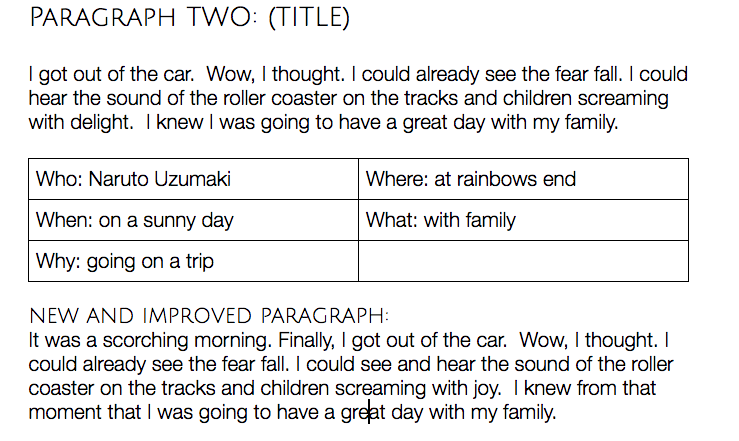
The follow up task was Revealing Paragraphs. This involved a number of steps.  First, students had to unpack a reveal paragraph by identifying the Ws. Next, they added in an interesting title.  Lastly they found ways to improve the paragraphs by making them more interesting by adding in a hook and some extra description.




Summing it up

Overall I am pleased with how this went.  Both groups were able to create some interesting reveal paragraphs.  I think using YouTube really helped, especially with my lower writers. It was also important that the students planned out the Ws before writing their paragraphs.

Using Google Docs was useful as all students could collaborate on the same document during our guided writing session.  I had the Doc projected up on the SMART board, so was able to discuss the paragraphs as well as address any errors. It will also be something that we will be able to return to, unlike writing on whiteboards that will disappear after the lesson.

I did notice that my class struggles with correctly using dialogue.  I will work on this next week before I continue onto teaching the 'Events' section of a recount.

Wherever possible, I will definitely be using Google Docs as a form of modelling books as well as using YouTube to help students in writing.


Thursday, 9 February 2017

I Found a New Digital Tool & it is AWESOME!

So a few weeks ago I wrote a blog post about some digital tools that I'd newly discovered and was keen to use in my classroom.  One of those mentioned was Mentimeter.  It sounded great and I was so excited to use it.  I signed up and began creating my first interactive presentation.  I created two activities, and then it told me I needed to pay a subscription in order to add more.  Needless to say I was super gutted... and seriously considering paying. Instead, I did a quick Google search for similar digital tools.  I couldn't really find anything.

I randomly stumbled upon a digital tool when reading Jennifer Gonzalez's blog post about digital tools to use this year.  And I am so glad I did because I discovered Nearpod! It was Jennifer's number one pick, and I can see why!

Why Nearpod is so Great


As far as I can tell, Nearpod is basically free.  You can pay a subscription if you want even more features (collaborate, fill in the blanks and memory test), but the free version lets you create 'live lessons', using quizzes, open-ended questions, and polls.  Also, unlike Mentimeter, you can add in heaps of activities on one presentation.

It's really easy to use.  You create a new presentation and choose between creating a slide with content, web content of an activity.


The 'live version' of Nearpod is the free one, and it is the best option.  This is one that the teacher uses during a teaching session.  The difference between the live and student paced lesson is that the teacher controls the live version.

My Nearpod presentation

I created a Nearpod presentation to introduce my learners to explanation texts. The purpose was to discover whether my learners could identify an explanation text, and if they could explain why/why not a text was an explanation.

In my presentation was:

  • A slide with a screenshot of a text type 
  • A quiz, asking "Is this an explanation?"
  • An open ended question, asking "Why is this/is this NOT an explanation?"
So for every text type, there were three slides.  I had about 6 different text types (each with the screenshot, quiz and open-ended question).

Because I wanted my learners to collaborate, they were put in groups of 3 or 4. This meant that they could share their ideas before deciding on their answers.

How it went

I was surprised with how enthusiastic my learners were during this lesson! I knew it would help them to be engaged, but they were also super excited by the task.   Even my most reluctant learners were super engaged and wanted to see whether they got the quiz questions correct. They liked that they could see what each other got, and there were no 

Teacher's screen for quiz
Students' screen for the quiz

Teacher's screen for open-ended question

Students' screen for open-ended question


I realised that if the teacher's display was always on, then the students would see who got the right answers.  This could be a problem, as some students could wait to see what the other groups said and then choose the correct answer.  To avoid this, when it was the quiz time, I changed my tab to a student's screen.


Final thoughts

I think Nearpod might be my new favourite digital tool.  The level of engagement and enthusiasm it brought to my lesson was unlike any other tool I have used.  It was a great way to see what my learners already knew about explanations and to begin to form some ideas about the structure, content and features of explanation writing.  The students were motivated to take part, which was a massive win, as I have some reluctant learners.  I could also tell that they felt proud and very pleased with themselves, when they saw that they got a correct answer.

I will definitely be using this tool again. Students could even create their own presentations to show what they have learnt.


Saturday, 2 July 2016

What I learnt at Tamaki College

Today the MDTA visited and observed each other's schools.  As an intermediate teacher, the wonder/concern of whether my learners will be prepared enough for college regularly plays in the back of my mind.  Therefore I thought observing a year nine english class would help answer my questions. I wanted to gain insight into what students do in year nine english, and to also see and hear first hand of the gaps the year nines have in their learning as they come into college.


Here are some of my thoughts...


Use of Kahoot!

Although I am familiar with Kahoot! and have used it and Socrative in my classroom, I have only used it as a form of summative assessment at the end of units. English teacher Vaughan Spurdle uses it in a variety of ways. Instead of merely playing the online quiz, Vaughan uses Kahoot! as a reference to further discuss and clarify their understandings. He makes the subsequent questions display time the maximum time and poses a question that asks whether the students understand what had been discussed.  Vaughan was constantly questioning his students and their responses, and guiding and supporting the learners in their understandings of punctuation. This was a really cool way to use Kahoot! that I hadn't thought of, so I will definitely be doing this in my classroom next .  He also spoke about using it at the beginning of a unit to identify prior knowledge and gaps in their learning.


Gaps in learners

Whilst in Vaughan's classroom I spoke to another teacher about the gaps that the learners come to college with.  The response I got was honest and quite worrying. A lot of students are coming into year nine English classes with little or no understanding of:

  • Structure of genres
  • Punctuation
  • Sentence types
  • Paragraphing  


This was alarming as these are the foundations of writing.  It really made me reflect on what I am doing in my classroom, and question whether I am doing enough to ensure my learners are understanding the basics of writing. 


Accelerated Reader


This is a program that has been recently implemented with year nine and ten learners at Tamaki College.  Learners choose a book, read it for 20 minutes each day, and take a quiz once they have completed the book. There is a wide selection of books, ranging from picture books to lengthy novels, and they are all levelled.  If a student gets more than 80% on their quiz, they are able to move up a level and read a more challenging text.  The Accelerated Reading programme has been very successful with the students. The kids now have a real interest and enthusiasm for learning.  Vaughan spoke about learners literally running to the library to get a new book after discovering they had moved up a level. Being able to move up levels has been really motivating for the learners who are both struggling and proficient readers.  The vast majority of learners are continuing to move up the levels, which indicates that the learners are becoming better readers and comprehenders.  Another point of difference of the program is the selection of books.  Instead of reading low interest texts, there is such a wide variety and they are books that teenagers typically enjoy reading anyway.  I saw the Harry Potter series, Lemony Snicket's Series of Unfortunate Events, graphic novels and many more high-interest texts.


Whilst I may not be able to implement this programme in my own class and school (it does come with a price tag), I can definitely take some aspects of it.  It is quite obvious that the learners love seeing themselves improve their reading and move onto more challenging texts.  If such a program is so highly motivational, perhaps I could create a similar program to run in my classroom. I could also use a range high interest texts like wide selection of texts within the Accelerated Reader program, as it is apparent that these texts actually hook the students in.


My visit to Tamaki College was very insightful and I am hoping that what I have learnt will enable me to better prepare my learners for college.